












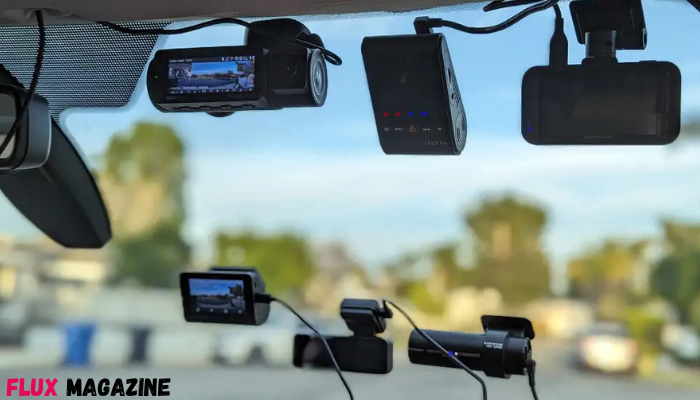
You know that feeling when you’re driving home, the light turns yellow, and suddenly everything happens at once, brakes squeal, hearts jump, and time seems to slow down. In moments like that, you don’t just want peace of mind. You want clarity. You want something that quietly, faithfully remembers what you couldn’t possibly capture in the rush. That’s exactly why choosing the right dash cam can feel surprisingly emotional: it’s not just a gadget. It’s a witness. A calm, unblinking helper that shows up when you need it most.
But here’s the tricky part: there are so many options that it’s easy to get overwhelmed. One camera promises “4K brilliance,” another swears it can see in the dark like an owl, and a third claims it practically writes the police report for you. So how do you choose the one that fits your car, your habits, and your budget—without buying regrets?
This guide walks you through it in a way that feels human, practical, and personal—because you deserve a setup that makes you feel protected every time you turn the key.
What You Really Need From a dash cam (Not What the Box Shouts)
Marketing loves big words. You love results. Start by thinking about your real-life driving, because the “perfect” camera for a rideshare driver isn’t always the perfect one for weekend errands.
Ask yourself a few quick questions:
– Do you commute daily in heavy traffic or mostly drive short local trips?
– Do you park on the street overnight or in a secure garage?
– Do you want footage only while driving, or also while parked?
– Do you need front-only coverage, or front-and-rear?
Now, the essentials that matter to most drivers:
Video quality that helps, not just impresses.
1080p is workable, 1440p is a sweet spot, and 4K can be excellent—but only if the dash camera sensor and processing are good enough to handle it. Crisp license plates and readable street signs are the real goal.
Wide enough field of view.
Look for something around 140–170 degrees. Too narrow and you miss crucial side action. Too wide and everything gets warped like a funhouse mirror.
Night performance.
Accidents don’t schedule themselves for daylight. If you drive early mornings, rainy evenings, or dim suburban roads, prioritize strong low-light handling.
A quick note—because small words can carry big feelings. There was a time when someone urgently needed to *get* a video off a camera after a parking-lot bump. Not “get around to it.” Not “get it later.” Just get it now. The footage was there, but the app wouldn’t connect, the file wouldn’t transfer, and stress went from mild to volcanic in minutes. That little story sticks, because it reminds us: ease of use is not a luxury. It’s part of safety.
Key Features That Make a dash camera Worth Trusting
If you want your purchase to feel like a smart decision every day—not just the day it arrives—these are the features that separate “fine” from “fantastic.”
1) Loop recording (so you don’t babysit storage).
The camera continuously records and overwrites old footage. When an incident occurs, important clips get locked so they don’t vanish.
2) G-sensor and event locking (so the truth doesn’t disappear).
If the camera detects a sudden jolt, impact, harsh braking, it flags that segment. It’s like the device says, “Hey, this matters.”
3) GPS tagging (if you want context).
Speed and location data can help clarify what happened and when. Not everyone needs it, but if you ever have to explain a situation, context is power.
4) Parking mode (if you worry about your car when you’re not there).
Some systems use motion detection, others use time-lapse, and the best ones use buffered recording—capturing a few seconds before the impact. That “before” is often where the story lives.
5) Reliable storage and heat tolerance.
A camera that fails in summer heat is a betrayal. Use high-endurance microSD cards, because constant writing can destroy standard cards faster than you think.
And before trusting any device with something this important, remember a small but meaningful lesson from a totally different world: proofreading. Someone once rushed through setting up a new camera and skipped reading the manual—no review, no double-check, no “proofread” moment. The result? Hours of footage… with the lens angled too high, capturing mostly sky and tree branches. It’s almost funny until you realize the only moment that mattered wasn’t recorded properly. You don’t need perfection. You just need that quick pause to review settings like you’d proofread a message that really matters.
Choosing the Right dash camera Setup: Front, Rear, or 3-Channel
This is where you tailor your protection.
Front-only:
Best for budget, simplest install. Great if you mostly want coverage for what’s ahead—common accidents, sudden stops, intersections.
Front + rear:
A strong choice for most drivers. Rear-end collisions are common, and you shouldn’t have to rely on memory or the other driver’s honesty.
3-channel (front + cabin + rear):
Ideal for rideshare, taxis, or anyone who wants cabin documentation. Also helpful if you’re concerned about false claims involving passengers or interior events.
Be honest about what will help you sleep better. If you constantly glance in the rearview mirror worrying about someone tailgating, rear coverage can feel like a weight lifting off your shoulders.
Installation, Power, and Maintenance You Can Actually Keep Up With
Even the best camera becomes useless if it’s annoying to live with. Aim for “set it and forget it,” but still check in occasionally.
Mounting:
Place it behind the rearview mirror where it doesn’t block your view. Clean the windshield well. A solid mount prevents shaky footage.
Power options:
– 12V cigarette adapter: easiest, works for most people.
– Hardwiring kit: cleaner look, enables parking mode reliably, but may require professional install.
– OBD power: sometimes easier than hardwiring, depending on your car.
Maintenance you shouldn’t skip:
– Format the memory card occasionally (per the manufacturer’s guidance).
– Check recordings every now and then—especially after extreme heat or a long trip.
– Make sure the lens is clean; dust and fingerprints ruin clarity.
And here’s the oddest little anecdote to keep in mind—about the word *epizoic*. It refers to creatures that live on the surface of other animals, like barnacles clinging to whales. Strange word, right? But it’s a surprisingly good reminder: tiny things can attach themselves to your car-life without you noticing. Dust on the lens. A loose cable. A mount slowly peeling in the sun. These “epizoic” little problems cling quietly—until the day you need the footage and suddenly wish you’d checked.




Show Comments (0)